Main Menu
Menu

Show posts

This section allows you to view all posts made by this member. Note that you can only see posts made in areas you currently have access to.

Show posts Menu

Messages - texus

#226
Installation help / Re: Codeblock and TGUI
12 April 2022, 13:58:20
tgui::GuiSFML was from TGUI 0.9, in TGUI 0.10 you can just use tgui::Gui.

Edit: Popup example seems to be the only one still using GuiSFML, I'll fix that line too. (The "GuiBase" has been updated on the website in the meantime, but the old version is still in some caches).
#227
Installation help / Re: Codeblock and TGUI
12 April 2022, 12:20:55
It looks like the 0.10 examples are a bit outdated, the class was renamed to BackendGui.
I'll fix it ASAP in all the examples.
#228
Installation help / Re: Codeblock and TGUI
12 April 2022, 09:50:00
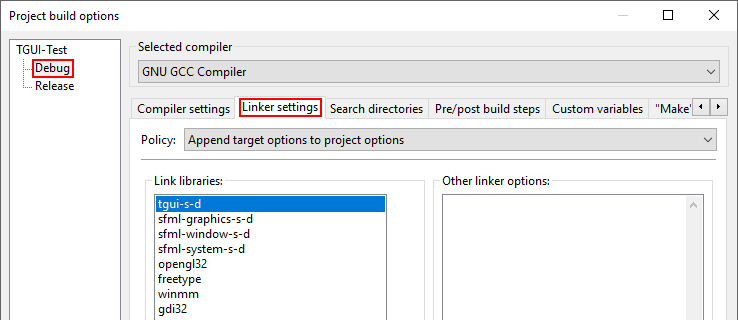
Those errors look related to SFML. When you link SFML statically, you also have to link to its dependencies. The linking errors suggest that you aren't linking to the following SFML dependencies:
Quotefreetype
opengl32
winmm
gdi32

If you are linking to them, then maybe the order of linking is wrong. When you specify the libraries to link, do you have tgui at the end? Perhaps try putting tgui-s-d at the top of the list instead. When statically linking, libraries need to be ordered based on what they depend on (and for GCC the order is first TGUI, then SFML, then SFML's dependencies).


The MinGW compiler version usually has to match exactly between your project and what was used to build SFML and TGUI.
While the errors you showed don't look related to this, I don't think you can mix GCC 8.1 from CodeBlocks with the 7.3 that was used to compile TGUI without getting other issues (linker errors or crashes). If you use GCC 8.1 then you will most likely have to compile TGUI yourself. There is no precompiled TGUI library for GCC 8.1 because there is no stable SFML library for that compiler. So unless you are using an SFML snapshot instead of SFML 2.5.1, I would expect that you would have to compile SFML yourself as well (or switch your compiler to MinGW-w64 7.3.0 x86_64‑posix‑seh for which both SFML and TGUI provide libraries).
You can try keeping your current setup, maybe it will just work, but I won't be fully surprised if the program crashes on rendering once you resolved the linking errors.
#229
Help requests / Re: Custom tgui::Signal functions
27 February 2022, 22:24:13
You can find some information about custom signals at https://tgui.eu/tutorials/0.10/custom-widgets/#adding-signals

Your Task class would have a "tgui::Signal onStateChange = {"StateChanged"};" member and TaskStateChanged would call "tasks[index]->onStateChange.emit(this);".
#230
Help requests / Re: List widgets from form.txt?
10 February 2022, 13:16:33
Do you want to save the form file with modified values?
I think you want something like this: (code is untested, there might be typos)
Code (cpp) Select
auto group = tgui::Group::create();
group->loadWidgetsFromFile("form.txt");
for (const tgui::Widget::Ptr& widget : group->getWidgets())
{
    auto button = widget->cast<tgui::Button>();
    if (button)  // If widget isn't a Button then 'button' will be nullptr
    {
        button->getRenderer()->setBackgroundColor(tgui::Color::Blue);
    }
}
group->saveWidgetsToFile("modified_form.txt");
#231
TGUI unfortunately doesn't work like that, widgets can't automatically size based on their children. If there is only a single child then you can use the hack that I suggested for the child window, but if you want a parent to get the size of 5 buttons then you will have to calculate it manually.

HorizontalWrap also doesn't even come close to what you want to do. It has to be given a width, and when the widgets that are placed next to each other no longer fit inside this width, a new row will be added.
HorizontalLayout might be a better choice, but even then you still have to specify a fixed width, as HorizontalLayout will divide its width to its children (i.e. the buttons will get a size based on the layout size, not the other way around).
#232
Are you setting a size for the HorizontalWrap?
By default the layout will fill the parent (i.e. the child window or panel), but you are setting the parent size to equal the HorizontalWrap.
You have to explicitly specify a size for either the panel or the layout.
#233
Help requests / Re: Get ListBox's scrollbar [0.9]
29 January 2022, 14:49:29
Yes, that would work. I was originally going to mention that you had to do something like that to prevent an endless loop, but while writing the reply I realized that it wouldn't result in an endless loop.

The onScroll signal has been added to both TGUI 0.10 and 0.9 in the versions on github (https://github.com/texus/TGUI)
#234
Installation help / Re: CMake couldn't find SFML
29 January 2022, 14:47:29
Can you show the full cmake output? For 0.10 I would expect there to be 2 warnings about not finding SFML (because it tries to find both SFML 3 and SFML 2).

There are 3 reasons that I can think of where cmake might find SFML but chooses not to accept it:
- There is a version mismatch. For example: TGUI 0.9 will fail to load the in-development SFML 3 version, it only accepts SFML 2
- Some dependency is missing. For example: somewhere in the output it might say that the SFML libraries were found but it couldn't find FreeType
- Incompatible libraries for the compiler. For example: building the project in 64-bit but finding 32-bit SFML libs, or mixing MinGW and Visual Studio libraries
#235
Help requests / Re: Get ListBox's scrollbar [0.9]
28 January 2022, 18:47:45
I'll see if I can add a callback for the scrolling this weekend.
Changing the scrollbar value of the second list with setScrollbarValue will cause another callback, but I guess that won't do much harm because it will call setScrollbarValue on the first list again with the value that it already had so it won't generate another callback.
#236
Sorry for the late reply, I forgot to answer this before. ChildWindow is a bit of a special case: you probably want to set its client size, but you can't change that automatically. The only thing you can change automatically is the entire size, which includes the borders and title bar. You could try something like this, where the hardcodes values correspond to border width and title bar height:
childWindow->setSize(bindWidth(layout) + 2, bindHeight(layout) + 22);
#237
Help requests / Re: Get ListBox's scrollbar [0.9]
27 January 2022, 22:14:52
It's currently not possible.

I would rather not provide direct access to the scrollbar, but maybe I could add something like listBox->onScroll(...).
In what scenario do you need to know whether the value of the scrollbar changed? I prefer to understand the use case before I add code for it.

Until then, there is already a hack to figure out if the listbox was scrolled: check every frame whether the value of listBox->getScrollbarValue() has changed compared to the last frame.
#238
Help requests / Re: Align text inside ListBox
23 January 2022, 12:33:41
Actually you can already do it, but you have to use ListView instead of ListBox.

You can do something like this to emulate the list box and center the text:
Code (cpp) Select
listView->addColumn("", 0, tgui::ColumnAlignment::Center);
listView->setHeaderVisible(false);
listView->setExpandLastColumn(true);
listView->setHorizontalScrollbarPolicy(tgui::Scrollbar::Policy::Never);
#239
Help requests / Re: Align text inside ListBox
23 January 2022, 12:28:45
It's currently not possible, but it doesn't seem that difficult to implement.
Text is always centered vertically and I can't think of a case where it shouldn't be. For horizontal alignment I can understand that you might want it centered instead of left aligned. So I'll try to have a look later today if I can add a setTextAlignment function for that.
#240
Help requests / Re: Custom Widgets and Themes
19 January 2022, 08:27:21
Quotefor this code its giving me "name followed by '::' must be a class or namespace name"
There seems to be a bug in TGUI_RENDERER_PROPERTY_RENDERER that requires your custom class to be in the "tgui" namespace, otherwise the code doesn't compile. It's because the code uses "Theme" instead of "tgui::Theme".
Edit: adding "using Theme = tgui::Theme;" before "#include <TGUI/RendererDefines.hpp>" seems a better workaround though. Then you don't need to put your class in the tgui namespace.

QuoteOther problem i have is that i cant figure out third parametar for TGUI_RENDERER_PROPERTY_RENDERER which is RENDERER
I had to check the code to figure this out, it could have been named better (e.g. FALLBACK_RENDERER).
- if the ChildWindow section in the theme contains a MaximizeButton subsection then this will be used for the renderer (MaximizeButton = second parameter to TGUI_RENDERER_PROPERTY_RENDERER)
- Otherwise, a ChildWindowButton section is searched in the root of the theme (i.e. NOT a subsection of ChildWindow). (ChildWindowButton = third parameter to TGUI_RENDERER_PROPERTY_RENDERER)
- Otherwise, an empty renderer object is used for the maximize button

I'm actually not sure if the fallback works though. So I wouldn't rely on it.
#241
Help requests / Re: Custom Widgets and Themes
18 January 2022, 08:19:41
I seem to have been underestimating the amount of required work yesterday.

You will indeed need your own renderer class in combination with rendererChanged.
And you can use nested sections, see e.g. "Scrollbar" property in Label. It is used to load a renderer of a subwidget though, so not if you simply want to group some properties.

I even wrote down the required code for custom renderers in my tutorials a while ago: https://tgui.eu/tutorials/0.10/custom-widgets/#changing-renderer
#242
Help requests / Re: Custom Widgets and Themes
17 January 2022, 22:35:47
If you want custom properties (i.e. define something other than properties such as BackgroundColor that already exist in the base classes) then you need to override the "void rendererChanged(const String& property)" function in your custom widget. It will be called with the name of the property (e.g. "BackgroundColor") when loading the theme. You can look at existing widgets for what the function should contain.

I don't think subsections are supported. You will have to make a CheckedGroupBackgroundColor property instead of having a section called CheckedGroup that contains a BackgroundColor property.
#243
Help requests / Re: OnSizeChange() difference
15 January 2022, 22:20:35
QuoteIs there a way to get difference of new size - old size on size change?
No, you will just have to store the old size yourself.

QuoteI dont get where this parametar goes and how to do it
Callback functions can have optional parameters. The onSizeChange member is of type SignalVector2f, which allows your callback function to either have no arguments or take a tgui::Vector2f as parameter. So both of these lines are valid:
Code (cpp) Select
w->onSizeChange([](){ std::cout << "size changed\n" << std::endl; });
w->onSizeChange([](tgui::Vector2f newSize){ std::cout << "size changed\n" << std::endl; });

More information about the signals can be found in the tutorial: https://tgui.eu/tutorials/0.10/signals/
#244
Help requests / Re: Drawing Shapes within gui
28 December 2021, 22:25:33
QuoteCan i draw sf::RectangleShape or any other shape within custom widget?
Sure. Just look at some widgets (e.g. EditBox::draw) as an example on how they draw things.

The line you need is this:
Code (cpp) Select
target.drawFilledRect(states, size, color);

The position is based on the states (it starts at the widget position at the beginning of the draw() function and you can add to it with "states.transform.translate"). The size of the rectangle is specified as second parameter.

Quoteif i make custom widget that inherits from tgui::Panel i see that i cant override draw function
I'm not sure why you think you can't, because you can just override the draw function again.
Code (cpp) Select
void draw(BackendRenderTarget& target, RenderStates states) const override;
(Use BackendRenderTargetBase instead of BackendRenderTarget if using TGUI 0.9)

The implementation of your draw function will look like this:
Code (cpp) Select
void YourCustomWiget::draw(BackendRenderTarget& target, RenderStates states) const
{
    // Draw the background of the panel and all widgets inside it
    Panel::draw(target, states);

    // Draw your own shapes here
    //target.draw...
}


QuoteSorry for frequent questions but im relatively new :)
No problem, I don't mind.
#245
Feature requests / Re: Animations
24 December 2021, 13:15:37
Quotei cant figure out how to make gui handle updates for it.
You can't yet, the gui only handles the show and hide animations. That's why I need to add some new functions to the Widget class.
If you just update the animation yourself then you however don't need the new functions and can already use the animations without waiting until I add proper support for them.

I've been looking at the code that has to be changed and noticed that this is annoying to handle in a backwards compatible way, so the new functions may only be added to TGUI 0.10-dev and not to 0.9

Edit: I have added the moveWithAnimation and resizeWithAnimation functions to Widget in the 0.10 branch on github.
The following example code would move the widget from its current position to x=100, y=50 over a duration of 0.5 seconds:
Code (cpp) Select
widget->moveWithAnimation({100, 50}, 500);
#246
Feature requests / Re: Animations
23 December 2021, 08:34:19
QuoteI thought using texture for boxshadows, but now that you added rounded panels this cant be used (i think).
The method would still work if you can create an image with such rounded borders. I wonder if this can be done easily in GIMP by using a few careful selections and radial gradient fills (I don't have time to check right now).
Edit: I've attached a file that I think could work (you would have to create it yourself depending on how much rounding the corners have). You can show it with the following code:
Code (cpp) Select
auto pic = tgui::Picture::create({"RoundBorders.png", {}, {9, 9, 2, 2}});
gui.add(pic);
pic->setSize(100, 100); // Any size you want


The file was created in GIMP by creating a 20x20 image with transparent background, adding a radial gradient fill of a circle with a diameter of 20px and then selecting a circle of diameter 10px in the center of the image and deleting those pixels (i.e. making them transparent again). This results in an image that can be used around widgets with 5px rounded corners, and the shadow is 5px thick. You can change the image size (same as outer circle diameter) and the inner circle diameter to adapt for different rounded corners and shadow thickness.
The middle rect when loading the image is always {imageWidth/2 - 1, imageHeight/2 - 1, 2, 2} for this situation.

This is of course only one way of doing it, you can do it yourself with vertices and sfml (which have the advantage of not needing a different image for different shadow thicknesses and rounded corners) or with some other tool.

QuoteThis is the first time i see braces for implicit conversation tbh.
My explanation about what the line does is technically wrong, the brackets aren't doing an implicit conversion.
The function expects a Layout2d object which can be implicitly converted from tgui::Vector2f. The tgui::Vector2f class can be implicitly converted from an sf::Vector2f. Since c++ doesn't do 2 implicit conversions in a row, it won't accept the function call if you pass an sf::Vector2f. The line I gave is in reality equivalent to "widget->setPosition(Layout2d(pos))" which would then use an implicit conversion from sf::Vector2f to tgui::Vector2f to pass to the Layout2d constructor.
The "widget->setPosition(tgui::Vector2f(pos))" call on the other hand would do an explicit conversion of the Vector2f types, but then do an implicit conversion to Layout2d. The end result is the same, but this is technically not what happens when writing "setPosition({pos})".
#247
Feature requests / Re: Animations
22 December 2021, 22:52:12
QuoteIs it possible to add animations on setSize() and setPosition()?
You could look at MoveAnimation::update in TGUI/src/Animation.cpp to see the few lines that are needed to implement it. Now that I looked at the code myself, I realize that it looks like it already does exactly what you need though. I though that it would be more limited, but it accepts any start position or size, the only limitation is the functions in the Widget class itself. So maybe I'll have a look soon if I can add some additional functions to Widget to create a move and resize animation.

QuoteBoxShadows?
That looks difficult to do properly, I'm not even sure where to start with that (even if I had the time for it). Maybe you can emulate it by placing a Picture (which would contain an image of the shadow) behind the widget? If a "middle" rectangle is provided when loading the texture then 9-slice scaling is used so that you can give the picture any size without stretching the shadow. So as long as all shadows have the same width (e.g. 10px at each side of the widget) then you can do this with a single image.
Something like the following (code was not tested).
Code (cpp) Select
// shadow.png is 25x25 image with center 5x5 pixels as fully transparent and the pixels around it are the semi-transparent borders of width 10px
auto shadow = tgui::Picture::create(Texture{"shadow.png", {0, 0, 0, 0}, {10, 10, 5, 5});
shadow->setPosition({otherWidgetPos.x - 10, otherWidgetPos.y - 10});
shadow->setSize({otherWidgetSize.x + 20, otherWidgetSize.y + 20});
gui.add(shadow);


QuoteCan you add sf::Vector2f support for setSize() setPosition() as well?
They have an overload that takes a tgui::Vector2f type. Although I suggest you change your sf::Vector2f into a tgui::Vector2f in cases where you are only dealing with TGUI, there is actually an implicit conversion between the sf and tgui classes. The conversion doesn't happen automatically here because a Layout object is required, but all you have to do is put braces around your sf::Vector2f:
Code (cpp) Select
sf::Vector2f pos;
widget->setPosition({pos});  // equivalent to widget->setPosition(tgui::Vector2f(pos));
#248
The setRoundedBorderRadius function has been added to PanelRenderer in TGUI 0.9 and 0.10-dev.

I did notice one other limitation though. Since TGUI can only clip rectangles, widgets inside the panel can still be drawn outside the rounded corners (if you place a widget there).

The 0.10-dev downloads on the download page have been updated. If you don't use Visual Studio or want TGUI 0.9 then you will have to build TGUI yourself (with the source code from github).
#249
It's not in TGUI yet, but it indeed shouldn't be hard to add.

I didn't want to add rounded borders to all widgets because with the current design it would be a lot of copy-pasting work and requires changing each individual widget. The idea was to first redesign the widgets so that they are rendered with reusable components. Adding rounded borders then would immediately make it available for all widgets. But the redesign had some issues and was delayed.
Because all previous requests about rounded borders were about the button widget, I decided to add setRoundedBorderRadius to the button renderer to at least allow using it for the most common use case.

Do you only need it for the Panel widget?
Does it matter that the mouse events still treat the widget as a rectangle for now? (Because ignoring the mouse events when on the corners seems to be only implemented when using textures, even for the button widget)
Then I can quickly add that to TGUI.
#250
For anyone that sees this in the future: the situation is now completely different.

SDL 2.0.17 has added a SDL_RenderGeometry function which makes it possible to use the SDL_Renderer for all rendering instead of requiring OpenGL directly.

TGUI 0.10-dev now also has an SDL_RENDERER backend which makes use of this functionality. A CanvasSDL class has just been added to this backend to which you could draw SDL_Texture objects:
Code (cpp) Select

SDL_Texture* imgTexture;  // The image to render to the canvas

auto canvas = tgui::CanvasSDL::create({400, 300});

SDL_SetRenderTarget(renderer, canvas->getTextureTarget());  // Let drawing happen on the canvas instead of the window
SDL_RenderClear(renderer);                                  // Clear the contents of the canvas
SDL_RenderCopy(renderer, imgTexture, NULL, NULL);           // Draw an image to the canvas
SDL_SetRenderTarget(renderer, nullptr);                     // Let further drawing happen on the window again